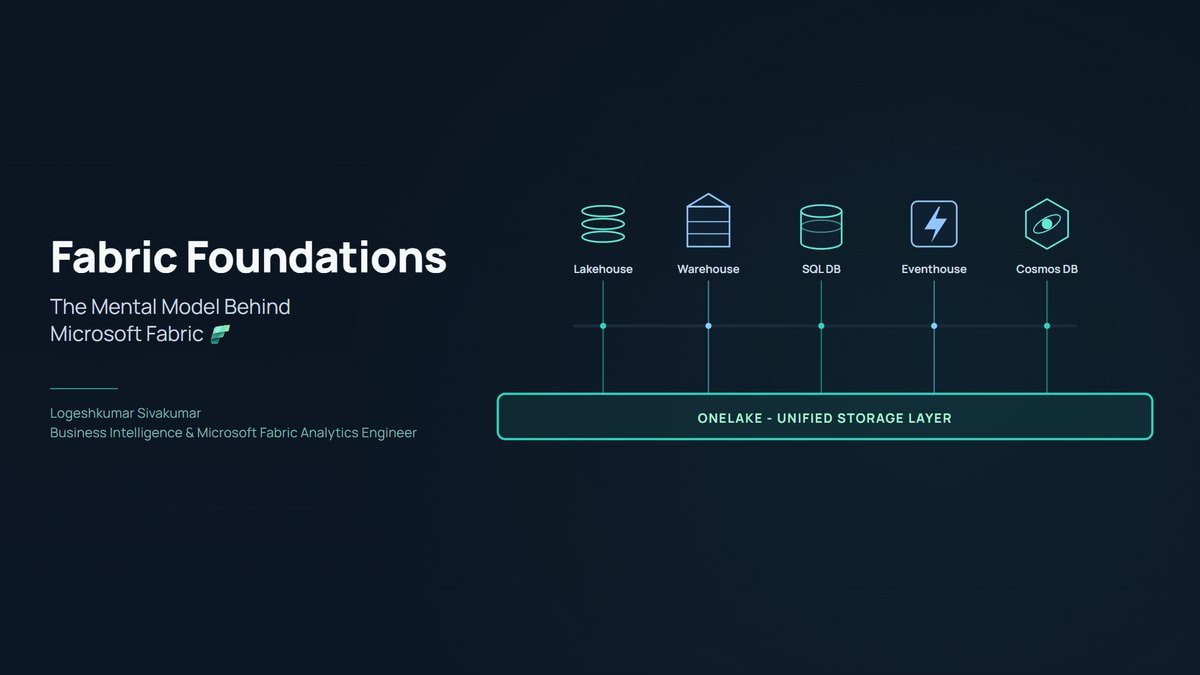
Most people start Microsoft Fabric by opening a notebook or building a report, then get stuck two steps in because nobody gave them the map first: what Fabric actually is, where the data lives, and which item to create for which job. That gap costs weeks.
What Microsoft Fabric Actually Is
Microsoft Fabric is a single software-as-a-service analytics platform that replaces a stack of separate tools with one product. Instead of stitching together a data lake, a warehouse, a streaming service, and a BI tool, you get all of it as workloads inside one platform, sharing one storage layer and one security model.
The workloads worth knowing by name: Data Engineering (Lakehouse and Spark), Data Factory (pipelines and Dataflow Gen2), Data Warehouse, Real-Time Intelligence (Eventhouse and Eventstream), Databases (SQL Database and Cosmos DB), Data Science, and Power BI. Everything you build in any of these, a Lakehouse, a pipeline, a report, is called an item. Items live in a workspace. Workloads produce items, items live in workspaces, and all the underlying data lands in one place: OneLake.
Why One Storage Layer Changes the Rest of the Decisions
OneLake is Fabric's single, unified logical data lake for the entire tenant. It's provisioned automatically, and every workload writes to it in open Delta Parquet format. That single detail is why Spark, T-SQL, KQL, and Power BI can all read the same physical copy of a table with no conversion step and no separate sync job to maintain.
Shortcuts extend that further. A shortcut is a reference to data that lives somewhere else (another workspace, or external storage like S3, ADLS, or GCS) without physically copying it. You query it as if it were sitting locally. That's how Fabric lets you unify data across locations without multiplying copies of the same table.
The Decision Every Project Starts With
Before writing a line of code, every Fabric project answers one question: where should this data live? Get it wrong and you spend months fighting the platform.
- Lakehouse: developing with Spark, or handling unstructured or mixed data
- Warehouse: T-SQL with full multi-table transactions on structured data
- Eventhouse: streaming events or telemetry that need real-time analytics
- SQL Database: an operational app with many small reads and writes
- Cosmos DB: NoSQL documents or vector search for an AI workload
These stores aren't competing options, they cooperate. A common pattern is landing raw, large data in a Lakehouse, then serving curated, modeled data from a Warehouse or a Direct Lake semantic model on top of it.
Capacity, Capacity Units, and SKU
Every workspace runs on a capacity, which is the compute you're actually paying for. Capacity is measured in Capacity Units (CU) and sized by SKU, labeled F2, F4, F8, and upward, where a larger number means more CU available. A commonly used threshold is the F64 SKU, at or above which report consumers do not each need a per-user Power BI license.
Every workload in a workspace draws from that same pool: Spark jobs, Warehouse queries, and Direct Lake all consume CU. Fabric absorbs short spikes through bursting and smoothing, but sustained overuse triggers throttling, where operations slow down or queue. This is the part beginners skip and then get burned by exactly when it matters most, during a month-end reporting crunch when every job wants compute at once.
Where This Shows Up in Practice
A team consolidating separate lake, warehouse, and BI tooling into Fabric isn't just simplifying their architecture diagram. They're removing the sync jobs that kept five copies of the same table in sync, giving every engine one governed source of truth, and getting a single, predictable compute bill tied to SKU size instead of five separate infrastructure line items.
The Takeaway
Fabric's whole design rests on three ideas: one open storage layer underneath every workload, a decision tree for picking the right store on top of it, and a shared capacity pool that all of it draws from. Learn that map before you open a notebook, and everything else in Fabric starts making sense faster.
What tripped you up when you first started with Fabric? Curious what beginners are running into right now. 💬
References:
- OneLake overview - Microsoft Learn
- Microsoft Fabric decision guide: choose a data store - Microsoft Learn
- Understand Microsoft Fabric licenses - Microsoft Learn
#MicrosoftFabric #DataEngineering #OneLake #PowerBI #Lakehouse #DataWarehouse #FabricAnalytics #FabricCapacityunits